Strategy Shortlist
The Strategy Shortlist is a filter on the Scheduled tab that shows upcoming matches fitting chosen trading strategies and tags each row with the strategy it matched.
This panel may not be visible for all membership tiers. If you don't see it, that's your plan — not a fault.
How it works
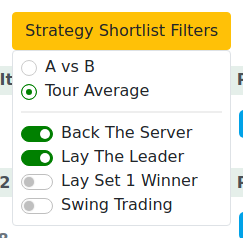
Open the Strategy Shortlist dropdown on the Scheduled tab. Choose a comparison mode and tick the strategies you want to screen for.
Comparison mode
| Mode | What it compares |
|---|---|
| A vs B | The two players directly — head-to-head fit |
| Tour Average | Each player against a broader tour benchmark |
Use A vs B when you want the matchup-specific fit; use Tour Average for a wider screen across the day.
Strategies
Four strategies are available: Back the Server, Lay the Leader, Lay Set 1 Winner and Swing Trading.
For what each strategy means and how to trade it, see the stats site's Strategies pages — this guide doesn't repeat that material.
OR logic — more ticks = more matches
Ticking more strategies widens the list, it doesn't narrow it. A match shows if it fits any ticked strategy. Tick two strategies and you'll see all matches matching either one.

Strategy tags on rows
Once the shortlist is active, matched rows display small strategy tags — labels showing which strategy the match qualified under. They're identifiers, not instructions. What to do with a match is explained on the stats site.
Notes
The Shortlist filters Scheduled (upcoming) matches only. It has no effect on LIVE or Finished matches.
Ticking more strategies widens the list — OR logic. More boxes = more matches.
Your shortlist choices are remembered in this browser (not your account). If you switch to a different browser or device your picks won't be there.
A match can drop off your shortlist if its details change (e.g. odds moved) so it no longer fits, or if it has started and left the Scheduled tab.
Tips & Tricks
- Use A vs B for head-to-head fit; Tour Average for a broader daily screen.
- Add strategies one at a time and watch the list grow — that's the OR logic at work.
- Read strategy tags as labels, not instructions. The trading intent lives on the stats site's Strategies pages.
- Build your shortlist on Scheduled in the morning, then move the picked matches into My Matches to watch live.
- Shortlist choices live in this browser — re-set them if you're on a different device.
FAQ
What is the Strategy Shortlist? A filter that screens today's upcoming matches against trading strategies and tags each matching row, so you can build your daily watchlist quickly.
What's the difference between "A vs B" and "Tour Average"? A vs B compares the two players directly (head-to-head fit); Tour Average screens each against a broader tour benchmark. Full explanation on the stats site.
What are the strategy tags on a match row? Small labels showing which strategy a match qualified under (e.g. Back the Server) — a quick reason it's on your shortlist.
Can I combine more than one strategy? Yes — tick as many as you like.
If I tick more strategies, does the list get wider or narrower? Wider. A match shows if it fits any ticked strategy, so more boxes = more visible matches.
Does a strategy tag tell me what to back or lay? No — it flags the match as a fit. The trading intent is explained on the stats site's Strategies pages, not here.
Is this the same as the stats-site strategies? Same strategy concepts, applied to today's upcoming matches. See the stats site for what each one means.
Does the shortlist apply to LIVE matches too? No — it filters Scheduled (upcoming) matches only.
Where do I learn what each strategy actually means for trading? On the stats site's Strategies pages. This guide links there rather than repeating it.
Why did a match drop off my shortlist? Its details changed (e.g. odds moved) so it no longer fits, or it started and left the Scheduled tab.
Can I export my shortlisted matches? Yes — use the Export button on the Scheduled tab. It captures the list you're currently viewing, shortlist filter included.